Service

VRAM Guard — Garde-Mémoire GPU & Système

Surveillance RAM / VRAM / CPU / températures en temps réel · v1.2.0. Votre modèle IA sature la VRAM ? VRAM Guard le voit, vous le dit et vous propose la bonne action — avant que la machine ne s'effondre.
Disponible v1.2.0 Go · Linux · Windows · macOS
Capture réelle de VRAM Guard

Capture réelle de VRAM Guard.

📊
Surveillance temps réel RAM, VRAM (GPU le plus chargé), CPU, swap — statut à trois niveaux : OK / WARNING / CRITICAL.
🔍
Détection du modèle actif Quel modèle tourne (Ollama, nvidia-smi) et s'il est partiellement déchargé vers la RAM/CPU.
⚡
Estimation du ralentissement 1× (0 % offload) → ~2× (50 %) → ~5× (100 % CPU), présentée comme estimation.
🛠️
Suggestions correctives Processus les plus lourds et gain attendu si arrêtés. Jamais d'action automatique.

Le problème

Votre modèle IA sature la VRAM ? VRAM Guard le voit, vous le dit et vous propose la bonne action — avant que la machine ne s'effondre. Fenêtre discrète, toujours au premier plan, zéro télémétrie.

Contrôler sa VRAM c'est contrôler l'inférence générée et les watts dépensés. Quand la VRAM n'est pas le seul point de pression, VRAM Guard suit aussi la RAM, le CPU, le swap et les températures GPU/CPU.

Prix

dès 0,25 USDC / 1er mois

5,99 USDC/an · 10 USDC à vie · licences 3/6/9/12 mois, sans renouvellement automatique.

10 jours d'essai gratuit — lancements illimités.

Le garde-fou, en détail

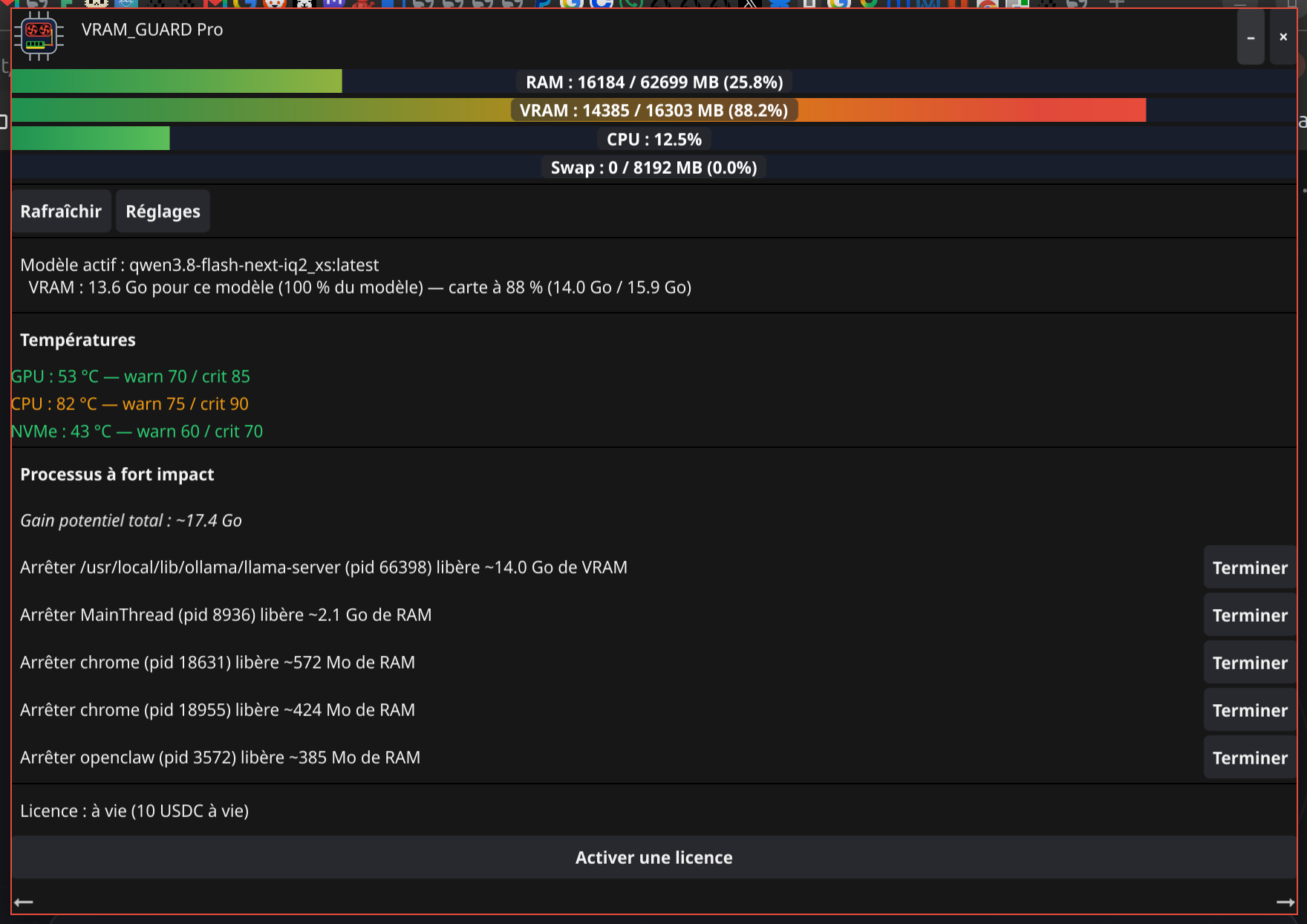
Capture réelle de l'outil sur une machine Linux : VRAM à 88,2 %, modèle en mémoire, processus à fort impact listés avec le gain attendu.

Capture réelle de VRAM Guard
Capture réelle de VRAM Guard.
BAD VRAM Guard
BAD VRAM Guard.

Surveillance temps réel

RAM, VRAM (le GPU le plus chargé pilote le statut), CPU, et swap (si activé).

Statut clair à trois niveaux

OK (vert), WARNING (orange), CRITICAL (rouge) — le plus critique parmi les ressources.

Détection du modèle actif

Quel modèle d'IA tourne (Ollama, et en best-effort nvidia-smi), et s'il est partiellement déchargé de la VRAM vers la RAM/CPU.

Estimation du ralentissement

Un ordre de grandeur (1× à 0 % offload, ~2× à 50 %, ~5× à 100 % CPU), clairement présenté comme une estimation.

Températures

Quand accessibles, avec seuils warn/crit réglables. Jamais une valeur inventée.

Suggestions correctives

Quels processus pèsent le plus et ce que les arrêter libérerait. Jamais d'action automatique : tout est à confirmer.

Pourquoi un garde-fou plutôt qu'un tueur

VRAM Guard est un moniteur et un aide à la décision : il dit ce qui se dégrade et de combien, avant l'OOM. Il ne tue jamais rien d'office. Si vous voulez agir, c'est vous (ou votre agent) qui valide — via --apply <pid> dans le CLI, ou le bouton « Terminer » dans le GUI.

Sortie JSON agent-ready — le cœur CLI émet un JSON structuré, conçu pour être lu par un agent IA ou un script.

Accès & licence

Plateformes

Go · Linux · Windows · macOS. Installation par archive.

Licence

Double licence AGPL v3 + commerciale. Voir la licence.

Télécharger & acheter

Binaires publiés pour Linux, Windows et macOS. Le cœur CLI vguard-cli est libre et gratuit ; l'application fenêtrée est soumise à licence (10 jours d'essai).

Interface pour agents : vguard-cli --query --json (mesure JSON), --apply <pid> explicite. Carte machine : vram-guard-agent-card.json.

Essai gratuit (10 jours)

L'application fenêtrée se teste 10 jours, lancements illimités, sans paiement. Activez votre essai avec un wallet (signature, jamais obligatoire) : 1 essai par wallet. Le cœur CLI reste libre.

Service

VRAM Guard — GPU & System Memory Guard

Real-time RAM / VRAM / CPU / temperature monitoring · v1.2.0. Your AI model saturates VRAM? VRAM Guard sees it, tells you and proposes the right action — before the machine collapses.

Available v1.2.0 Go · Linux · Windows · macOS
Real capture of VRAM Guard

Real capture of VRAM Guard.

📊
Real-time monitoring RAM, VRAM (most loaded GPU drives status), CPU, swap — three-level status: OK / WARNING / CRITICAL.
🔍
Active model detection Which AI model is running (Ollama, nvidia-smi) and whether it's partially offloaded to RAM/CPU.
⚡
Slowdown estimate 1× (0% offload) → ~2× (50%) → ~5× (100% CPU), clearly presented as an estimate.
🛠️
Corrective suggestions Heaviest processes and expected gain if stopped. Never automatic action.

The problem

Your AI model saturates VRAM? VRAM Guard sees it, tells you and proposes the right action — before the machine collapses. A discreet window, always in the foreground, zero telemetry.

Controlling VRAM means controlling generated inference and watts spent. When VRAM is not the only pressure point, VRAM Guard also tracks RAM, CPU, swap and GPU/CPU temperatures.

Price

from 0.25 USDC / 1st month

5.99 USDC/year · 10 USDC lifetime · 3/6/9/12-month licenses, no auto-renewal.

10-day free trial — unlimited launches.

The guardrail, in detail

Real capture of the tool on a Linux machine: VRAM at 88.2%, model in memory, high-impact processes listed with the expected gain.

Real capture of VRAM Guard
Real capture of VRAM Guard.
BAD VRAM Guard
BAD VRAM Guard.

Real-time monitoring

RAM, VRAM (the most loaded GPU drives status), CPU, and swap (if enabled).

Clear three-level status

OK (green), WARNING (orange), CRITICAL (red) — the most critical resource wins.

Active model detection

Which AI model is running (Ollama, best-effort nvidia-smi), and whether it is partially offloaded from VRAM to RAM/CPU.

Slowdown estimate

An order of magnitude (1× at 0% offload, ~2× at 50%, ~5× at 100% CPU), clearly presented as an estimate.

Temperatures

When accessible, with adjustable warn/crit thresholds. Never an invented value.

Corrective suggestions

Which processes weigh the most and what stopping them would free. Never automatic action: everything must be confirmed.

Why a guardrail rather than a killer

VRAM Guard is a monitor and a decision aid: it says what is degrading and how much, before OOM. It never kills anything by default. If you want to act, you (or your agent) validate — via --apply <pid> in the CLI, or the "Terminate" button in the GUI.

Agent-ready JSON output — the CLI core emits structured JSON, designed to be read by an AI agent or script.

Access & license

Platforms

Go · Linux · Windows · macOS. Archive installation.

License

Dual license AGPL v3 + commercial. See the license.

Download & buy

Binaries published for Linux, Windows and macOS. The vguard-cli core is free and open; the windowed application requires a license (10-day trial).

Agent interface: vguard-cli --query --json (JSON measurement), explicit --apply <pid>. Machine card: vram-guard-agent-card.json.

Free trial (10 days)

The windowed app can be tested 10 days, unlimited launches, no payment. Activate your trial with a wallet (signature, never mandatory): 1 trial per wallet. The CLI core stays free.